
Disclosure: Coco n Deals may earn a commission if you sign up through links on this page, at no extra cost to you. I only write about tools I’ve actually researched myself.
If you’ve ever needed a WordPress site to do more than blog — a property listing with price and bedrooms, a staff directory with roles and photos, a recipe site with cook times and ratings — you’ve run into custom fields. And if you’ve looked into custom fields, you’ve run into the big question: Meta Box or ACF? This Meta Box review answers it honestly. Meta Box is a powerful, developer-friendly (but increasingly no-code-friendly) plugin for building custom fields and content types, and it’s one of the two names that dominate this space. I’ll cover what it does, where it shines, and — the part everyone actually wants — how it stacks up against ACF so you can pick the right one. As someone who works with WordPress daily, this is a comparison I care about getting right.
Why Trust This Review
Nobody pays me for a nice verdict at Coco n Deals. For this I went through Meta Box’s features, its extension model and pricing, and how it genuinely compares to the alternatives in real WordPress use. Everything I’ve reviewed is in my reviews archive.
What Is Meta Box?
Meta Box is a WordPress plugin — really a framework — for creating custom fields and custom content structures, the building blocks that turn WordPress from a blog into a proper content management system for any kind of data. If you’re wondering how to add custom fields in WordPress cleanly and at scale, Meta Box is one of the two go-to answers. At its core it lets you create custom meta boxes and fields (via a drag-and-drop builder or code), build custom post types and taxonomies, add fields to categories and taxonomies, create settings pages, and organise everything neatly with tabs, columns and conditional show/hide logic. The architecture is the clever part: the core plugin is free and lightweight, and you add only the specific extensions you need (for things like custom tables, front-end forms, relationships between content, and more) — so you’re not loading a bloated all-in-one. That modularity is a genuine performance and flexibility advantage. It caters to two audiences at once: developers who want a fast, code-friendly framework to build custom themes and plugins (and can even bundle Meta Box into products they sell), and no-code users who want the drag-and-drop builder without touching code. Free core, premium extensions, and top-rated support round it out. As a best WordPress custom fields plugin candidate, it’s squarely in the top tier.
What Meta Box Gets Right
- The modular, lightweight architecture: free core plus only-the-extensions-you-need means no bloat — a real performance and flexibility win over heavier all-in-one plugins. You build exactly the toolkit you need.
- Genuinely powerful and flexible: custom fields, post types, taxonomies, settings pages, relationships, custom tables — it handles complex data structures that turn WordPress into a true CMS.
- Serves coders and no-coders: developers get a fast code-friendly framework; non-developers get a drag-and-drop builder — rare to do both well, and Meta Box does.
- Developer-friendly licensing: you can build custom themes and plugins with it and even sell them — a genuine plus for freelancers and agencies building for clients.
- Free core with strong support: you can start free and scale into premium extensions, backed by well-regarded expert support — a low-risk on-ramp.
Meta Box vs ACF: The Honest Comparison
This is the comparison everyone wants, so here it is straight:
| Meta Box | ACF (Advanced Custom Fields) | |
|---|---|---|
| Architecture | Modular, extension-based | More all-in-one |
| Performance | Lightweight core | Slightly heavier |
| Best for | Complex/custom data, devs | Fast, intuitive UI |
| Learning curve | Steeper (more power) | Gentler, very popular |
| Free version | Yes + extensions | Yes + Pro |
The honest read on Meta Box vs ACF: both are excellent, and you won’t go wrong with either — the choice is about fit. ACF is famous for its clean, intuitive interface and gentle learning curve; it’s often the pick for those who want the fastest, friendliest custom-fields experience, and its huge popularity means endless tutorials. Meta Box is the more modular, performance-conscious, developer-leaning option — its extension model keeps things lightweight and it handles complex custom data (custom tables, relationships) especially well, which is why developers building serious custom sites often prefer it. So: choose ACF for the friendliest UI and biggest community; choose Meta Box for modular performance and heavy-duty custom data work. For many builders it comes down to which workflow clicks — and trying the free version of each is the honest way to decide.
Getting Started
1. Start with the Free Core Plugin

Install the free Meta Box core to build basic custom fields and meta boxes — enough to learn the workflow and see if it clicks for you before spending anything.
2. Add Only the Extensions You Need
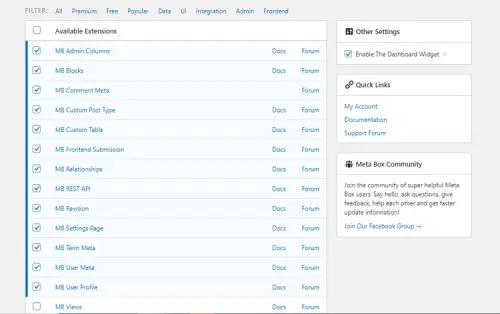
The modular model is the point — add extensions for custom tables, front-end forms, relationships and so on only as your project requires. Keeps your site lightweight and your costs matched to your needs.
3. Consider the Bundle for Agencies / Serious Builders
If you build sites for clients or need the full toolkit, the premium bundles (including lifetime options) with all extensions and priority support are the cost-effective route — and the licensing lets you build and sell products with it.
What Users Say
The developer community rates Meta Box highly — the recurring praise is for its power, flexibility and lightweight, modular architecture, which lets people build exactly the custom data structures they need without the bloat of heavier plugins. WordPress builders value that it handles complex requirements (custom tables, relationships, front-end forms) cleanly, and the ability to build and sell client products with it is a real draw for freelancers and agencies. The free core plus targeted extensions model gets credit for keeping both performance and cost sensible. For serious custom WordPress work, it’s a trusted, top-tier tool.
The honest cons. The learning curve is steeper than ACF’s — Meta Box’s power comes with more to learn, and beginners may find ACF’s interface friendlier to start. The modular extension model, while great for keeping things lean, means working out which extensions you need (and their combined cost) rather than one simple package. The community and tutorial base, while solid, is smaller than ACF’s enormous one. And for a very simple site with a couple of custom fields, it may be more capability than you need. None of that dents the core: for powerful, flexible, performance-minded custom-fields work, it’s excellent. For more tools I’ve reviewed, my
reviews archive has them.
The Bigger Picture
Custom fields are one of those unglamorous foundations that quietly decide how far you can push WordPress, and the Meta-Box-versus-ACF debate has run for years precisely because both are genuinely good. The healthy way to see it: this isn’t a case of one winner and one loser — it’s two excellent tools with slightly different philosophies, and the “right” one depends on whether you prioritise the friendliest interface (ACF) or modular performance and heavy custom-data power (Meta Box). For anyone building serious, data-rich WordPress sites, Meta Box has earned its place at the top of the conversation.
The Verdict
For powerful, flexible, performance-conscious custom-fields work, it’s a strong yes — especially for developers and serious builders. This Meta Box WordPress plugin review lands on: the modular, lightweight architecture is a genuine advantage, it handles complex custom data (tables, relationships, front-end forms) beautifully, it serves coders and no-coders alike, and the free core plus targeted extensions is a sensible, scalable model. As a best WordPress custom fields plugin candidate, it’s firmly top-tier. On Meta Box vs ACF: both are excellent — pick ACF for the friendliest UI and biggest community, Meta Box for modular performance and heavy custom-data work. For a simple couple-of-fields site it may be overkill; for serious custom WordPress builds, it’s exactly right. Power & flexibility: 5/5. Performance: 4.5/5. Ease for beginners: 3.5/5. Value: 4.5/5.
A Few Common Questions
Is Meta Box better than ACF?
Neither is strictly better — both are excellent, and it depends on your needs. ACF is famous for its friendly, intuitive interface and huge community, making it the easier start. Meta Box is more modular, lightweight and developer-leaning, and handles complex custom data (custom tables, relationships) especially well. Choose ACF for the smoothest UI, Meta Box for modular performance and heavy-duty custom data work. Trying both free versions is the best way to decide.
Is Meta Box free?
The core plugin is free and lightweight — enough for basic custom fields and meta boxes. You then add only the premium extensions you need (custom tables, front-end forms, relationships and more), with annual and lifetime pricing options and bundle plans for agencies. That modular model means you pay for exactly the capability you use, and can start free to learn the workflow before spending.
How do I add custom fields in WordPress with Meta Box?
Install the free Meta Box plugin, then use its drag-and-drop builder (or code, if you prefer) to create custom fields and group them into meta boxes attached to your posts, pages or custom post types. You can add fields to taxonomies and settings pages too, and organise them with tabs and columns. It’s designed for both no-code users and developers, so you can work whichever way suits you.
Is Meta Box good for beginners?
It can be — the drag-and-drop builder makes basic custom fields approachable without code — but its learning curve is steeper than ACF’s because it’s more powerful and modular. If you’re brand new and want the gentlest start, ACF’s interface may feel friendlier. If you’re comfortable learning a more capable tool (or you’re a developer), Meta Box rewards the effort with more flexibility and better performance on complex sites.
