

Disclosure: Coco n Deals may earn a commission if you sign up through links on this page, at no extra cost to you. I only write about tools I’ve actually researched myself.
There are a hundred website builders that’ll help you throw up a pretty brochure site, and honestly most of them are fine at it. Where they fall down is the moment you need your site to actually do something — store data, run a simple web app, power a member directory or a booking system — without hiring a developer. That’s the specific gap Simbla aims at, and it’s what makes this Simbla website builder review more interesting than “yet another drag-and-drop tool.” It’s an AI-assisted, no-code builder with a genuine database engine baked in. So the real question isn’t “can it make a website” (it can) — it’s whether that database edge is worth choosing it over the big, familiar names. Let’s dig in.
Why Trust This Review
Nobody pays me for a nice verdict at Coco n Deals. For this I went through Simbla’s features, pricing tiers and positioning, independent software-review coverage, and how it stacks up against the mainstream builders. Everything I’ve reviewed is in my reviews archive.
What Is Simbla?
Simbla is an AI-powered, no-code website builder — developed by MyBusiness CRM out of San Francisco — that lets you create fully responsive websites with a drag-and-drop interface and no coding knowledge. So far, so familiar. The thing that actually sets it apart, and the reason to consider it over a Wix or a Squarespace, is the built-in database. Simbla lets you create and manage your own online database within the platform, which means you can build database-driven websites and simple web applications — not just static pages. Think member portals, directories, booking or inventory systems, internal tools — the kind of thing that normally needs a developer or a stack of plugins. On top of that it’s got the modern AI layer: smart recommendations for design and content, so the AI website builder side helps you get a professional-looking site up fast. It covers the usual bases too — responsive templates, custom domains, built-in SEO tools, blog and e-commerce capability — and offers a free plan to start, with paid tiers scaling up for more users and features. As a best no code website builder with database contender, that combination (visual builder plus a real database, no code required) is a genuinely useful niche that the big brochure-first builders don’t fill as well.
What Simbla Gets Right
- The built-in database is the real differentiator: being able to create database-driven sites and simple web apps without code is genuinely useful — it’s the thing most drag-and-drop builders can’t do, and Simbla’s whole reason to exist.
- Genuinely no-code: the drag-and-drop interface means non-technical users can build responsive, professional-looking sites — and even the database side is designed to be usable without writing SQL.
- AI assistance speeds things up: smart design and content recommendations help you get a polished site live faster, which lowers the barrier for beginners and busy owners.
- Free plan to start: you can build and host a site on the free tier before committing — a low-risk way to test whether the platform fits your needs.
- All-in-one cloud platform: hosting, database, SEO, e-commerce and CMS in one place — no stitching services together, which suits small teams without a developer.
Is Simbla Right for You?
A quick fit-check before you sign up:
| If you want… | Simbla is… | Because | Note |
|---|---|---|---|
| A data-driven site / web app | A strong fit | Built-in database, no code | Its core strength |
| A simple brochure site | Fine, but so are others | Many tools do this | Compare on price/design |
| Maximum design freedom | Maybe limiting | Less flexible than top builders | Try the free plan |
| An enterprise-grade CMS | Growing into it | Still maturing | Check current features |
My honest steer: Simbla makes the most sense when you specifically need the database/web-app capability — that’s where it beats the mainstream builders and earns its place. If you just want a straightforward brochure or portfolio site, it’ll do the job, but you’re then choosing on design flexibility and price against very established competitors, and the big names may edge it there. Use the free plan to test your actual use case before paying — that’s the smart way to find out if the fit is right.
Simbla Pricing and Features, Briefly
On Simbla pricing and features: there’s a free plan to build and host a single site with limited templates and features — genuinely useful for testing — and paid tiers that scale up (more users, full template access, higher limits, support), running from budget-friendly entry pricing up to higher business tiers. The value question is straightforward: if you’re using the database and web-app features, the pricing is very reasonable for what would otherwise need custom development; if you’re only building a basic site, weigh it against similarly priced mainstream builders. Always check the current tiers on their site, as SaaS pricing shifts.
Getting Started
1. Start on the Free Plan
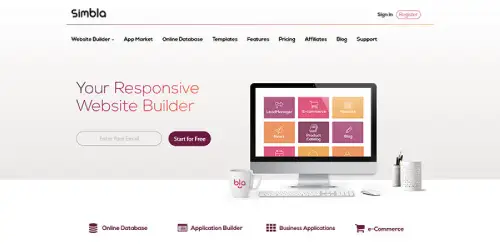
Build and host one site free to test the platform and, crucially, the database features against your actual use case. The no-risk way to find out if Simbla fits before paying.
2. Test the Database / Web-App Features
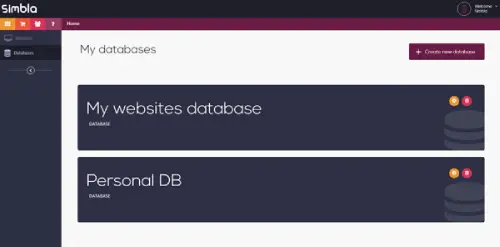
This is Simbla’s differentiator, so try it — build a small data-driven page (a directory, a form-backed list) to see whether the no-code database genuinely handles what you need.
3. Upgrade When You’ve Confirmed the Fit
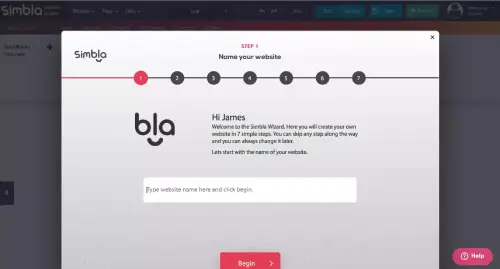
Move to a paid tier once the free plan has proved the platform works for your project — upgrade for more users, full templates and higher limits, not before you’ve validated the use case.
What Users Say
The positive feedback centres on ease and capability: non-technical users appreciate getting a functional, responsive site up without code, and those who use the database features value being able to build data-driven sites and simple web apps that would otherwise need a developer. The AI assistance and all-in-one nature (hosting, database, SEO in one place) get credit for simplicity, and small businesses, startups, freelancers and marketing teams are the natural fit — people who need capability without a dev team. For its specific niche, users are satisfied.
The honest cons. Simbla is still a growing platform, so it’s less mature than the giants — expect some rough edges and ongoing improvements rather than the deep polish of a Wix or Squarespace. Design flexibility can feel more constrained than dedicated page builders, so if pixel-perfect creative control is your priority, test that on the free plan first. The template range is narrower than the market leaders. And it’s less of a household name, so the community and third-party resources are smaller. None of that undercuts the core value: for no-code database-driven sites, it fills a real gap. For more tools I’ve looked at, my
reviews archive has them.
The Bigger Picture
The website-builder market is crowded and getting more so — every major player has bolted on AI, and “build a site in minutes” is table stakes now. Simbla’s smart move is not trying to out-Wix Wix on brochure sites, but owning the no-code-plus-database corner, which is a genuinely underserved need. If you’ve ever hit the wall where a normal builder can’t store or manage data and you don’t want to hire a developer, that’s exactly the wall Simbla is built to get you over — and that clarity of purpose is its strongest asset in a sea of look-alike builders.
The Verdict
For no-code, database-driven websites and simple web apps, it’s a genuine yes — and a distinctive one. This Simbla website builder review lands on: the built-in database is a real, useful differentiator that most drag-and-drop builders simply don’t offer, the no-code approach and AI assistance make it accessible, and the free plan lets you test the fit risk-free. As a best no code website builder with database option, it earns its niche. The honest caveats: it’s still maturing, design flexibility and template range trail the market leaders, and for a plain brochure site the established names may edge it on polish and price. So match it to the need — choose Simbla for the data capability, test on the free plan first, and it’s a smart pick. Database/web-app capability: 4.5/5. Ease of use: 4/5. Design flexibility: 3.5/5. Value: 4/5.
A Few Common Questions
What makes Simbla different from Wix or Squarespace?
The built-in database. Where most drag-and-drop builders make static brochure sites, Simbla lets you create and manage an online database to build data-driven websites and simple web apps — directories, portals, booking systems — without code or a developer. That’s its real edge. For plain brochure sites the big names are more polished, but for no-code database capability, Simbla fills a genuine gap.
Is Simbla good for beginners?
Yes — it’s a no-code, drag-and-drop builder with AI design and content assistance, so non-technical users can build responsive, professional sites without coding. Even the database features are designed to be usable without writing SQL. Start on the free plan to get comfortable; the learning curve is gentle for basic sites, with a bit more to learn if you use the database capabilities.
Does Simbla have a free plan?
Yes — there’s a free plan that lets you build and host one website with limited templates and features. It’s genuinely useful for testing the platform (and especially the database features) against your actual use case before paying. Paid tiers scale up for more users, full template access and higher limits. Check the current pricing on their site, as SaaS tiers change.
Is Simbla worth it for a database-driven website?
If you specifically need a data-driven site or simple web app without hiring a developer, yes — that’s exactly Simbla’s strength, and the pricing is very reasonable versus custom development. If you only need a basic brochure site, weigh it against the more established builders on design and price. Test the database features on the free plan first to confirm they handle your specific need.
