
Skylum Review: Read What the Word Lifetime Covers
 By Alana Collins

STORE RATING
Photo editing has almost entirely moved to monthly subscriptions, and Skylum has built its whole pitch on not doing that. Pay once, own it.
That pitch is mostly true, and the exception is worth knowing before you buy. This Skylum review takes the pricing apart tier by tier, because the word lifetime is doing different work in different places on the same page.
The Three Tiers
| Plan | One time price | Devices | AI tools included |
| Desktop only | $129 | Desktop, lifetime | 365 days |
| All platforms | $159 | Desktop and mobile, lifetime | 365 days |
| All platforms Max | $199 | Desktop and mobile, lifetime | 1 year of Prime |
| Step from $129 to $199 | $70 | Adds mobile | Adds the Prime bundle |
One hundred and twenty nine dollars at the bottom, one hundred and ninety nine at the top. The gap is mobile plus a bundle.
All three are one time payments rather than subscriptions, and all three carry a 30 day money back guarantee, which is a fair window to decide whether an editor suits how you work.
There is no monthly option at all, which is unusual now and is clearly the point.
Stepping from $129 to $159 adds mobile for $30, and stepping again to $199 adds the Prime bundle of presets, LUTs, overlays, skies and courses for another $40. Whether that is worth it depends entirely on whether you use presets, and plenty of photographers never touch them.
The Word Doing the Heavy Lifting

Here is the part worth slowing down for.
| What lifetime covers | What it does not |
| The desktop application itself | AI tools beyond the first 365 days |
| Continuous updates to the app | Prime asset library after year one |
| Mobile on the higher tiers | Any guarantee about future AI features |
| Use on your own machine | Unlimited AI generation, a fair use policy applies |
The application is a lifetime licence. The AI tools that feature in most of the marketing are listed at 365 days.
On the two lower tiers the AI tools are described as 365 days of access, while the application itself is lifetime, and that distinction is easy to skim past when both words appear in the same box on the same pricing table.
For a lot of buyers this will not matter much, because the core editor keeps working forever and the AI features are extras. For anyone buying specifically because of the generative tools, it matters a great deal, since those are the parts on a clock.
Skylum also notes that AI generation is subject to a fair use policy. That is standard for anything running on a server, and it is another reason to treat the AI side as a service rather than as software you own outright.
What Buyers Say
| Trustpilot, skylum.com | Figure |
| TrustScore | 4.6 out of 5 |
| Total reviews | 6,901 |
| Five star | 84% |
| One star | 4% |
| Negative reviews replied to | 100% |
| Profile note | Paid Trustpilot subscription |
Four point six from nearly seven thousand reviews, with every negative review answered.
That is a strong profile by any measure, and the praise is consistent about the thing that actually matters for this kind of software, which is that an amateur can produce a good looking edit quickly without learning a professional workflow first.
The complaints are narrower.
Features arriving later than the roadmap suggested, confusion over what a given plan actually includes, and occasional installation trouble, which between them describe a company that sells faster than it ships rather than one whose software does not work.
One detail to read with open eyes. The profile carries a paid Trustpilot subscription, which is common for software companies and does not mean reviews are fake, but it does mean the company has a commercial relationship with the platform showing its score.
Where Luminar Neo Fits
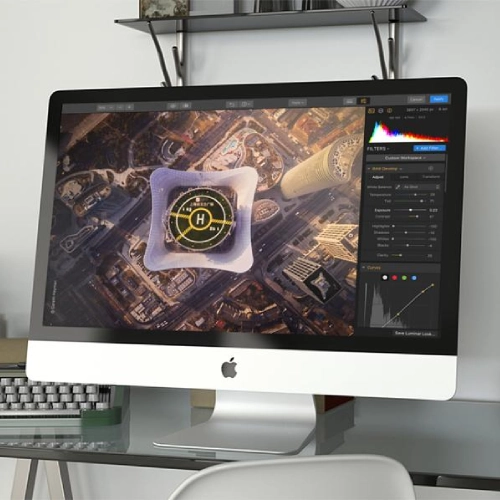
Being clear about the category helps more than a feature list.
- It is an editor and cataloguer, not a full professional pipeline
- Sky replacement and relighting are its signature tricks
- It also works as a plugin alongside other editors
- Results come fast, which is the whole appeal
Somebody who edits a few hundred holiday or family photos a year, wants them to look good without a course in curves and masks, and dislikes paying monthly for software is exactly who this is built for, and for that person a one time $129 is easy to justify.
A working professional shooting weddings or commercial jobs will probably keep a subscription editor as the main tool and use Luminar Neo alongside it for specific effects.
Who Should Buy
Buy the $129 desktop tier if you edit on a computer, you want a one time purchase, and you would use the AI tools as a bonus rather than the reason.
Buy the $199 tier only if you will genuinely use the preset and sky library. Skip all of it if your editing depends on generative tools long term, because that part of the deal is not a lifetime licence.
Final Verdict
| Category | Score |
| Editing Results | 8.5 / 10 |
| Ease Of Use | 9 / 10 |
| One Time Pricing | 8 / 10 |
| Plan Naming Clarity | 5 / 10 |
| AI Tools After Year One | 5 / 10 |
| Overall Score | 7.5 / 10 |
Seven and a half out of ten. A one time price from $129, a 30 day refund window, a 4.6 average from 6,901 reviews and every negative review answered add up to a fair, well liked product that spares you another monthly bill. What costs it points is clarity, because a lifetime licence on the application sits beside 365 days of AI tools in the same pricing table, and the tier names do not make the difference obvious. Anyone reading a Skylum review should decide first whether they are buying an editor or buying the AI, because only one of those is permanent.
FAQs
How much does Luminar cost?
$129 for desktop, $159 for desktop and mobile, and $199 for the Max tier, all one time payments.
Is it really a lifetime licence?
The application is. AI tool access is listed at 365 days on the lower tiers.
Is there a refund?
Yes, a 30 day money back guarantee on the plans listed.
Is Luminar Neo good for beginners?
Yes. Speed and simplicity are the main reasons buyers rate it highly.
Can I use it with another editor?
Yes. It works as a plugin alongside other photo editors as well as standalone.
Why is the Trustpilot score so high?
Buyers rate the software well, and the company answers every negative review. It also holds a paid Trustpilot subscription.
Do you agree with our review?
Comments (0)
All comments are reviewed and approved by an admin before appearing publicly.
No comments yet - be the first to share your thoughts.
Ask a Question
Got a question about this review or the brand? Ask below - our team answers what we can, and it'll appear here for other readers too.